

TL;DR:
- AI receptionists operate 24/7 to answer calls, schedule appointments, and route inquiries, reducing missed revenue for Australian small businesses. Proper setup involves a clear system prompt, real-time calendar integration, and ongoing performance review, with a hybrid approach recommended initially. Managed services like Bookeverycall offer fully handled deployment, eliminating configuration challenges and ensuring compliance with Australian privacy laws.
An AI receptionist is a 24/7 virtual call assistant that answers phones, books appointments, handles FAQs, and routes calls to the right person without any human involvement. For Australian small businesses, this technology addresses one of the most persistent revenue problems: missed calls. Missed calls cost Australian SMBs thousands of dollars annually, with some businesses losing up to $312,000 per year from unanswered enquiries. Platforms like My AI Front Desk, combined with scheduling tools like Calendly and Acuity, now make it possible for a tradie in Brisbane or a plumber in Sydney to deploy a fully functional AI voice receptionist in under an hour. This guide walks you through every step.
What does a good AI receptionist setup guide cover?
Before you touch any software, understand what you are actually building. An AI receptionist, also called an AI voice receptionist or virtual receptionist, sits between your phone number and your calendar. It answers every call, qualifies the caller, books the job, and either resolves the enquiry or transfers to a human when needed.
The core components of any working setup are:
- A business phone number (existing or new)
- An AI receptionist platform
- A knowledge base covering your services, hours, pricing, and FAQs
- A calendar or scheduling integration
- Escalation rules for calls the AI cannot handle
No-code AI receptionist platforms allow setup in under 10 minutes without IT skills. That means a sole trader running a cleaning business in Melbourne can configure a professional phone system in a lunch break. The barrier to entry is lower than most business owners expect.
What prerequisites and tools do you need before setup?

Getting your setup right starts before you log into any platform. Rushing this stage is the most common reason AI receptionists underperform in the first month.
Technology requirements
Your AI receptionist needs three things to function reliably: a stable internet connection, a compatible business phone number, and a platform that works with your existing phone system. Most modern platforms, including My AI Front Desk, work with your current Australian number via call forwarding. No new hardware is required.
Choosing the right platform
My AI Front Desk integrates with Calendly and Acuity in under 30 minutes, supports 99% scheduling accuracy, and costs approximately $65 per month for unlimited calls. That price point makes it accessible for most Australian service businesses. Below is a comparison of platforms suited to Australian SMBs.
| Platform | Monthly cost (AUD approx.) | Setup time | Key integrations | Best for |
|---|---|---|---|---|
| My AI Front Desk | ~$65 | Under 15 minutes | Calendly, Acuity | Tradies, service providers |
| Bookeverycall | Custom | Fully managed | Calendar, CRM, phone | Australian SMBs, trades |
| Trillet | Varies | Under 10 minutes | Zapier, Google Calendar | Solo operators |
Business information you must prepare
Before configuring any platform, gather the following:
- Business hours including public holidays
- Full service list with pricing where applicable
- Staff names and roles for call routing
- Top 10 FAQs your customers ask by phone
- Your preferred booking confirmation method (SMS, email, or both)
Pro Tip: Write your FAQs in plain conversational language, not formal business copy. The AI will deliver them verbatim, and callers respond better to natural phrasing.
Defining your AI persona
Your AI receptionist needs a name, a tone, and a clear set of boundaries. Decide upfront whether it will identify itself as an AI or operate under a staff name. In Australia, transparency builds trust, and most callers accept AI assistants when they are told clearly. Define the persona before you write a single line of scripting.
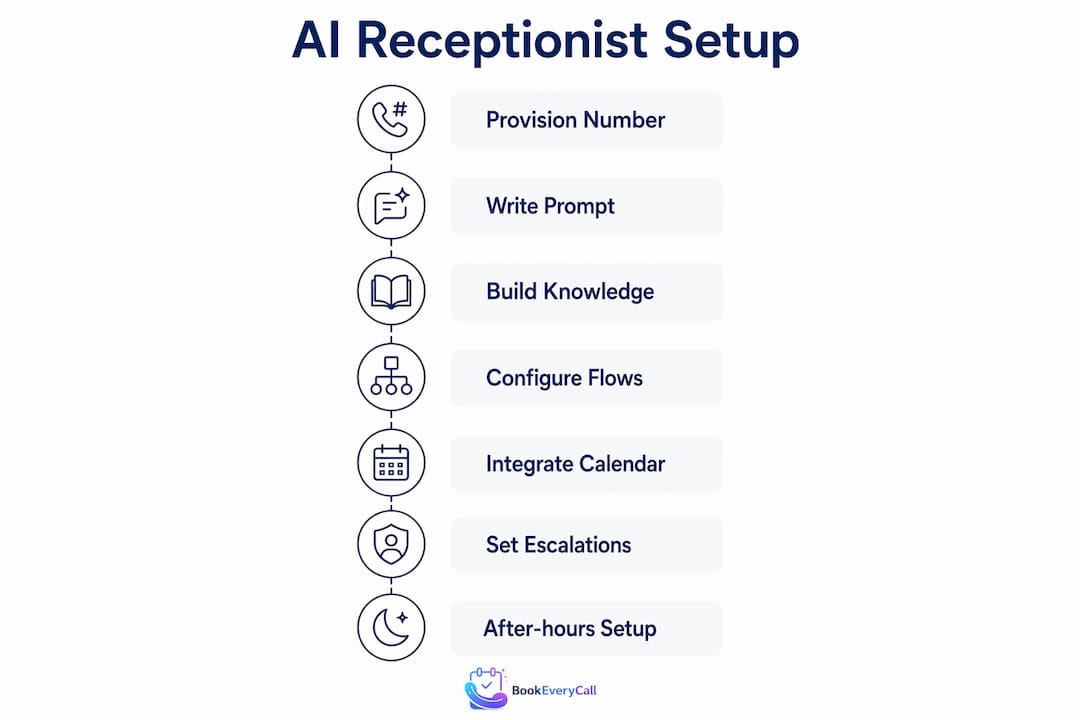
How to set up an AI receptionist: step-by-step
This process applies whether you are configuring My AI Front Desk yourself or working with a managed service like Bookeverycall. Follow these steps in order.
Step 1: Provision or port your business phone number
Log into your chosen platform and either connect your existing number via call forwarding or port it directly. Most Australian platforms support both options. Call forwarding takes under five minutes and is the fastest way to go live.
Step 2: Write your system prompt
A well-crafted system prompt defines the AI’s persona, tone, response limits, and fallback behaviour. This is the most important configuration step. Write it in clear sections: who the AI is, what it can help with, what it cannot do, and when to escalate. Ask one question at a time in the prompt structure. A vague prompt produces a vague AI.
Step 3: Build your knowledge base
Upload or type in your business information: services, pricing, hours, location, and FAQs. The more specific you are, the fewer calls the AI will need to escalate. A plumber in Sydney should include common job types (blocked drains, hot water systems, leak detection), typical response times, and callout fees.
Step 4: Configure conversation flows
Map out the most common call scenarios: new booking, existing booking enquiry, pricing question, emergency call. For each scenario, write a greeting, a qualification question, and a confirmation response. Test each flow using the platform’s built-in simulator before going live.
Step 5: Integrate your calendar
Real-time calendar integration prevents double bookings and maintains customer trust. Connect Calendly, Acuity, or Square by entering your booking platform credentials inside the AI platform. The AI will check live availability and hold a slot during the call before confirming. Never use a static availability list. It will cause conflicts within days.
Step 6: Set escalation triggers
Define the keywords and situations that send a call to a human. Common triggers include “complaint,” “urgent,” “cancel,” and “legal.” Escalation keywords and warm handoff scripts ensure the caller’s context travels with the transfer, so your staff member does not start from scratch.
Step 7: Configure after-hours and voicemail handling
Set a separate after-hours flow that still captures the caller’s name, number, and job type. This is where most Australian service businesses recover the most revenue. A caller who rings at 9pm on a Friday and gets a professional response is far more likely to book than one who hits voicemail. For a detailed walkthrough of this configuration, the after-hours booking setup guide covers the full process.
Pro Tip: Run at least 20 test calls across different scenarios before going live. Include edge cases like callers who give incomplete information or ask off-topic questions.
What are the most common AI receptionist setup mistakes?
Most problems with AI receptionists trace back to the first two weeks of operation. The setup is rarely the issue. The issue is not reviewing performance data and adjusting.
Incomplete knowledge base
If your AI does not know your pricing, it will either make something up or escalate every pricing call to a human. Neither outcome is acceptable. Audit your knowledge base weekly for the first month and add any question the AI could not answer confidently.
Poorly defined escalation triggers
An AI without clear escalation rules will attempt to handle calls it should not. Calls flagged for low sentiment or urgent issues must be routed with full context to avoid customer frustration from cold transfers. Review your escalation logs daily in the first two weeks.
Over-automation from day one
Deploying a fully autonomous AI on day one without a human fallback is a risk. Hybrid models where AI handles 80% of routine calls and humans manage complex or sensitive interactions produce the best results for both cost and customer satisfaction. Start with AI handling overflow and after-hours calls, then expand its role as you build confidence in the configuration.
Ignoring containment rates
Early review of call summaries and prompt tuning in the first weeks improves AI containment rates and customer experience. Target 60% or more of calls resolved without transfer. If you are below that threshold, your knowledge base or escalation triggers need work.
“The system prompt acts as the AI’s operating manual. Detailed and precise prompts lead to better conversational accuracy and fewer errors.” — GetVoIP, 2026
Pro Tip: Record and listen to 10 real calls per week for the first month. You will spot tone issues, missing FAQs, and awkward conversation flows that no dashboard metric will show you.
Best practices checklist for the first 30 days
- Review call summaries every morning for the first two weeks
- Add at least three new FAQ entries per week based on real calls
- Test escalation triggers with a colleague playing a frustrated caller
- Adjust AI tone and pacing if callers are speaking over the AI or hanging up early
- Schedule a formal performance review at day 30 with containment rate, booking conversion, and missed call data
City-specific considerations for Sydney and Melbourne
Australian cities have distinct business rhythms, and your AI receptionist configuration should reflect them.
Sydney
Sydney service businesses, particularly tradies and plumbers in the inner west and northern suburbs, experience high call volumes between 7am and 9am as property managers and homeowners call before work. Configure your AI to handle this peak window with a fast qualification flow: name, address, job type, and preferred time. Sydney callers tend to be direct and time-poor. Keep greetings under 10 seconds. For niche guidance on this, the AI receptionist for plumbers in Australia guide covers Sydney-specific booking patterns in detail.
Melbourne
Melbourne businesses see stronger after-hours call volumes, particularly in the eastern suburbs and CBD fringe. Configure a robust after-hours flow and set your AI to offer next-day booking slots proactively. Melbourne callers also respond well to a slightly warmer tone than Sydney callers, so adjust your AI persona accordingly.
Australian-specific configuration considerations
- Accent handling: Most modern AI platforms handle Australian accents reliably, but test with a range of speakers including regional accents from Queensland and Western Australia.
- Public holidays: Configure state-specific public holiday schedules. A Melbourne business needs different holiday rules to a Perth business.
- Privacy compliance: Australian businesses must comply with the Privacy Act 1988. Confirm your platform stores call data on Australian servers or in a jurisdiction that meets Australian Privacy Principles.
- Niche adaptations: Tradies across Brisbane and Adelaide benefit from AI configured to triage emergency jobs separately from standard bookings. The AI receptionist guide for tradies covers this triage logic in full.
Key takeaways
A successful AI receptionist setup requires a precise system prompt, real-time calendar integration, and a hybrid escalation model reviewed weekly in the first month.
| Point | Details |
|---|---|
| System prompt is the foundation | Write it in clear sections covering persona, limits, and escalation triggers before anything else. |
| Real-time calendar integration is non-negotiable | Connect Calendly or Acuity live to prevent double bookings and maintain caller trust. |
| Start hybrid, not fully automated | Let AI handle overflow and after-hours first, then expand its role as performance data builds. |
| Review containment rates weekly | Target 60% or more of calls resolved without transfer and tune your knowledge base accordingly. |
| City configuration matters | Adjust tone, peak hours, and public holiday schedules to match your specific Australian location. |
What I have learned from watching businesses deploy AI receptionists
I have watched a lot of Australian small businesses go live with AI receptionists, and the pattern is consistent. The ones that succeed treat the first month as a tuning phase, not a set-and-forget deployment. The ones that struggle assume the AI will figure it out on its own.
The biggest misconception I see is that a more sophisticated platform automatically produces better results. It does not. A basic platform with a well-written system prompt and a thorough knowledge base will outperform an expensive platform with a vague configuration every single time. The technology is only as good as the instructions you give it.
The hybrid model question comes up constantly. My view is that full automation is the wrong goal, at least initially. Customers calling about a burst pipe at 11pm do not need a perfect AI. They need a fast, calm response that captures their details and confirms someone will call back within the hour. That is achievable with even a simple setup. The emotional complexity of a billing dispute or a complaint is a different matter entirely, and no AI handles that as well as a trained human.
What genuinely surprises business owners is the impact on after-hours bookings. Most assume after-hours calls are low-value. The data says otherwise. Callers who ring outside business hours are often more motivated buyers because they have already decided they need the service. Capturing those calls converts at a higher rate than many businesses expect.
My recommendation: deploy incrementally. Start with after-hours and overflow. Review the data. Expand the AI’s role only when your containment rate and booking conversion numbers give you confidence. That approach produces durable results without the risk of a poor first impression at scale.
— Chay
How Bookeverycall can handle this for you
If this setup process looks like more work than you have time for, that is exactly the problem Bookeverycall solves.
Bookeverycall is a fully managed AI voice receptionist built specifically for Australian small businesses. It connects to your existing phone number, integrates with your calendar, and starts capturing and booking calls from day one. No configuration headaches, no prompt writing, no testing cycles. Bookeverycall handles tradies, electricians, HVAC businesses, plumbers, and service providers across Sydney, Melbourne, Brisbane, Perth, and Adelaide. If your business is losing jobs to missed calls, particularly after hours, the missed call AI service is the fastest way to stop that revenue loss. Visit bookeverycall.com to see how it works.
FAQ
What is an AI receptionist and how does it work?
An AI receptionist is a virtual assistant that answers phone calls, responds to FAQs, books appointments, and routes calls to humans when needed, operating 24/7 without staff. It uses voice AI technology connected to your phone number and calendar to handle routine enquiries automatically.
How long does AI receptionist installation take?
Most no-code platforms complete setup in under 15 minutes after sign-up, with full calendar integration achievable in under 30 minutes. Managed services like Bookeverycall handle the entire installation process on your behalf.
Do I need to change my existing phone number?
No. Most AI receptionist platforms, including My AI Front Desk, work with your existing Australian business number via call forwarding. No hardware changes or new SIM cards are required.
How do I handle calls the AI cannot answer?
Configure escalation triggers using keywords like “urgent,” “complaint,” or “cancel” to route those calls to a human with full context. A warm handoff script ensures the caller does not have to repeat themselves when transferred.
Is an AI receptionist compliant with Australian privacy laws?
Australian businesses must comply with the Privacy Act 1988 and the Australian Privacy Principles. Confirm your chosen platform stores call recordings and data on Australian servers or in a compliant jurisdiction before going live.
Permalink